Are you tired of juggling a million different tabs just to send one invoice? If you are a freelancer, a creative professional, or a small business owner, you know the struggle of “admin fatigue.” You started your business to create, not to spend five hours a day chasing payments and formatting emails. That is where HoneyBook comes in.
The Morphic Studio shares the information about how you can use this platform to take back your time. As of the latest May 2026 updates, HoneyBook has introduced even smarter AI automations and a more streamlined mobile experience, making it easier than ever to run a business from your phone or your desk. Let’s get your workflow sorted out once and for all.
HoneyBook
What is HoneyBook and Why Do You Need It in 2026?
HoneyBook is an all in one client management software designed specifically for service based businesses. Think of it as your virtual office assistant that never sleeps. It handles everything from the first time a lead reaches out to you, all the way to the final thank you note after a project is done.
In 2026, the platform has develop progress. It is no longer just about “forms.” With the new Smart Files 2.0 update, you can create interactive experiences for your clients that feel like a high end website. If you want to look professional and stay organized without losing your mind, this is the tool for you.
Step 1: Setting Up Your HoneyBook Account for Success
The first thing you need to do is lay the foundation. When you first log in, it can feel a little overwhelming, but don’t worry. You want to start with your Company Settings. This is where you upload your logo, set your brand colors, and connect your bank account so you can actually get paid.
One of the coolest things about the 2026 version of HoneyBook is the “Brand Kit” feature. It allows you to sync your website styles directly, so every document you send looks exactly like your brand. Make sure you also integrate your Google Calendar or Outlook so you don’t double book yourself.
HoneyBook
Step 2: Mastering the HoneyBook Lead Capture System
If you are still manually replying to “Inquiry” emails, you are doing it the hard way. The lead capture form is a game changer. You can embed this form directly onto your website (like your contact page) or share a direct link on your Instagram bio.
When someone fills it out, their info goes straight into your HoneyBook pipeline. You can even set up an “Auto-Reply” so the client gets a brochure or a pricing guide immediately. In 2026, HoneyBook added a “Lead Scoring” AI that tells you which clients are most likely to book based on their answers, helping you focus on the right people first.
HoneyBook
Step 3: Creating Interactive Brochures with HoneyBook Smart Files
Gone are the days of sending a boring PDF price list. With Smart Files, you create a statistical experience. You can include videos of yourself introducing your services, a gallery of your past work, and a “service selection” area where clients can click what they want.
The best part? Once they pick a service, the file can automatically take them to the contract and invoice page. It is a seamless flow. It makes the client feel like you are super tech savvy, even if you just used a template.
Step 4: Streamlining Invoices and Payments in HoneyBook
Let’s talk about the best part, getting paid. HoneyBook makes it stupidly easy for clients to pay you. They can pay via credit card or bank transfer. In the 2026 update, they have added “One-Click Apple Pay” and “Google Pay” options, which has increased payment speeds by nearly 40 percent.
You can set up payment schedules so the system automatically sends reminders when a second or third payment is due. You don’t have to send those awkward “Hey, where is my money?” emails anymore. The system does the “nagging” for you, in a very professional way, of course.
HoneyBook
Step 5: Using HoneyBook Automations to Save 10 Hours a Week
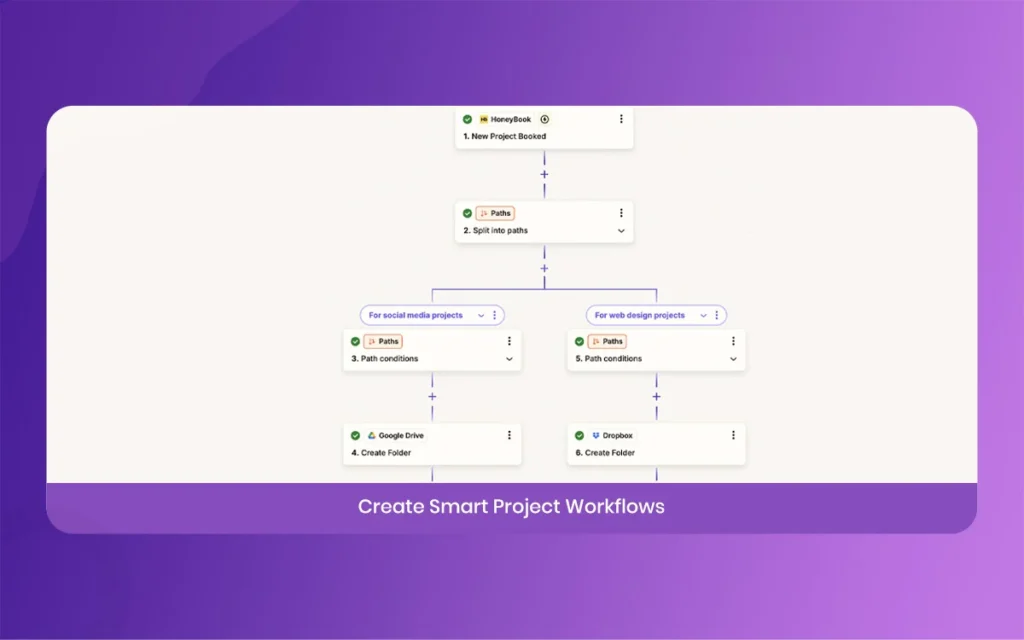
Automations are the secret sauce. This is where you tell HoneyBook, “If this happens, then do that.” For example, if a client signs a contract, automatically send them an “Onboarding Questionnaire” after 10 minutes.
Or, if a project ends, send a “Review Request” 3 days later. In 2026, the automation builder is drag and drop. It is very visual, so you can see exactly how your client moves through your process. It’s like having a robot twin who handles all the boring stuff.
Step 6: Managing Tasks and Scheduling via HoneyBook
You probably have a lot of “to-dos” for every project. HoneyBook has a built in task manager that links directly to your projects. You can create “Task Templates” for different services. So, if you are a photographer, your “Wedding Template” might include tasks like “Edit sneak peeks” or “Order album.”
Also, the Scheduler is a lifesaver. Instead of emailing back and forth to find a time to meet, you just send a link. The client sees when you are free, picks a time, and it’s done. It even sends the Zoom or Google Meet link automatically.
HoneyBook
Step 7: Analyzing Your Business Growth with HoneyBook Reports
How much money did you make last month? Where are your leads coming from? HoneyBook’s “Reports” tab gives you all this info. In 2026, the reporting dashboard is much more detailed. It shows you your “Conversion Rate,” which is the percentage of people who inquiry versus those who actually hire you.
Follow these numbers helps you realize if you need to raise your prices or if you need to work on your sales pitch. It’s not just about managing projects, it’s about growing a real, profitable business.
HoneyBook
Basic Features Comparison: Why HoneyBook Wins in 2026
Instead of a table, here is a breakdown of the core components that make this tool stand out this year,
Payment Speed: Most users report getting paid 2x faster because of the integrated “Pay Now” buttons in every file.
AI Writing Assistant: A new 2026 feature that helps you draft professional emails if you have writer’s block.
Client Portal: A dedicated space where your clients can log in to see all their files, invoices, and project updates in one spot.
Mobile App functionality: The app now allows you to edit contracts and send full smart files on the go, which wasn’t as easy in previous years.
Integration Ecosystem: It connects seamlessly with Zapier, Quickbooks, and Slack, keeping your whole tech stack happy.
HoneyBook
Final Thoughts on Your HoneyBook Ride
Starting with a new tool can be scary, but HoneyBook is built for humans, not tech geniuses. If you take it one step at a time, starting with your settings and then moving into lead capture, you will see a huge difference in your stress levels within the first week.
Think of your time as your most valuable asset. Stop wasting it on manual labor. Let HoneyBook handle the “business” side of things so you can get back to the work you actually love. Go ahead and give it a try; your future self will thank you for being so organized.
HoneyBook
Related Article
September 1, 2026
Augmented Reality News: 7 Exclusive Breakthroughs for an Incredible Year | The Morphic Studio
Navigating the Latest Augmented Reality News Environment Welcome to another exciting deep dive into the statistical universe brought to you by The Morphic Studio. If you have been keeping up with tech headlines lately, you already know that statistical overlays and spatial computing are changing how we interact with our physical surroundings. The year 2026 […]
September 1, 2026
VR Horror Games: 13 Incredible Titles for a Brutal Scare – The Morphic Studio
Welcome to the ultimate guide for anyone looking to test their nerves inside a headset. When you strap a display to your face, flat screen rules no longer apply. VR Horror Games You are no longer watching a character run from danger on a distant monitor, because you are right there in the middle of […]
August 31, 2026
Meta Quest 4 Release Date: The Master Guide to 2026’s Most Incredible VR | The Morphic Studio
Virtual reality has traveled a long road over the last few years. We have moved from bulky, tethered headsets that needed expensive gaming computers to sleek, standalone machines that fit right inside a small travel backpack. If you follow immersive technology here at The Morphic Studio, you already know that Meta has been leading the […]