Creating realistic architectural details is a big part of 3D modeling, especially when you are working on houses that have a tropical vibe. One of the most important parts of an Indonesian house design is the Lubang Angin. This is a ventilation hole that lets air flow through a building. It is not just about keeping the house cool, but it also adds a beautiful aesthetic touch to the walls.
In this guide, we will look at how to create a Lubang Angin in Blender using the latest 2026 updates. Blender has changed a lot recently, especially with Blender 5.1 and 5.2 LTS, making it easier for artists to create complex patterns without breaking a sweat.
Why Lubang Angin is Important for 3D Architecture
Before we jump into the buttons and sliders, let’s talk about why we need Lubang Angin in our models. If you are designing a house for a tropical climate, you cannot just have solid walls. The air needs to move. In the real world, these are often made of cement or wood and have very cool geometric patterns.
When you add a Lubang Angin to your 3D scene, it makes the house look much more “real.” It shows that you understand how buildings work. Plus, when you render your scene, the way light travels through these holes creates amazing shadows on the floor. This is a trick many pro artists use to make their work look high-end.
Lubang Angin
Planning Your Lubang Angin Design
Before you start clicking around in Blender, you should have a plan. There are many types of Lubang Angin. Some are simple squares, while others look like flowers or stars.
Simple Geometric: These are usually square or rectangular holes.
Patterned Roster: These are like decorative blocks with complex shapes inside.
Modern Slotted: These are long, thin horizontal lines often seen in modern minimal houses.
In the 2026 version of Blender, we have better tools like the improved “Geometry Nodes” and the new “Array on Surface” modifier. These tools allow us to place many ventilation holes across a large wall instantly.
Step-by-Step Guide: Creating Lubang Angin in Blender
Now, let’s get into the actual work. We will use a method that is clean and does not create “messy” geometry.
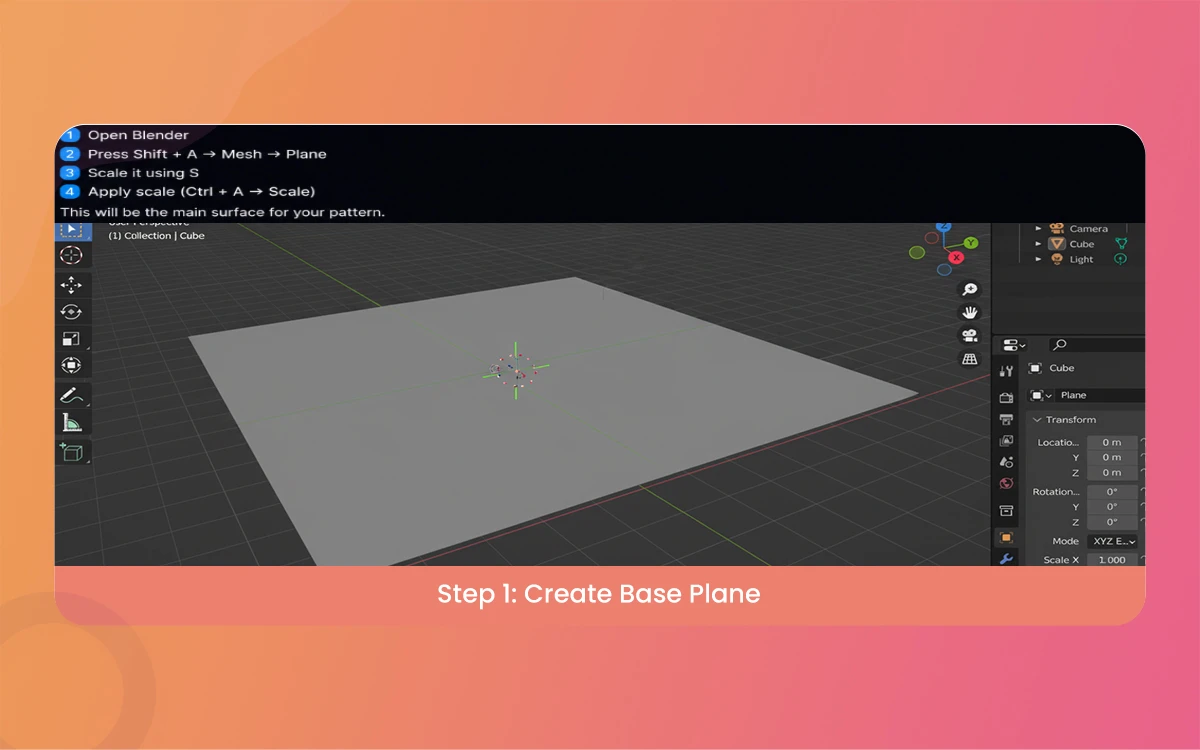
1. Preparing the Wall Mesh
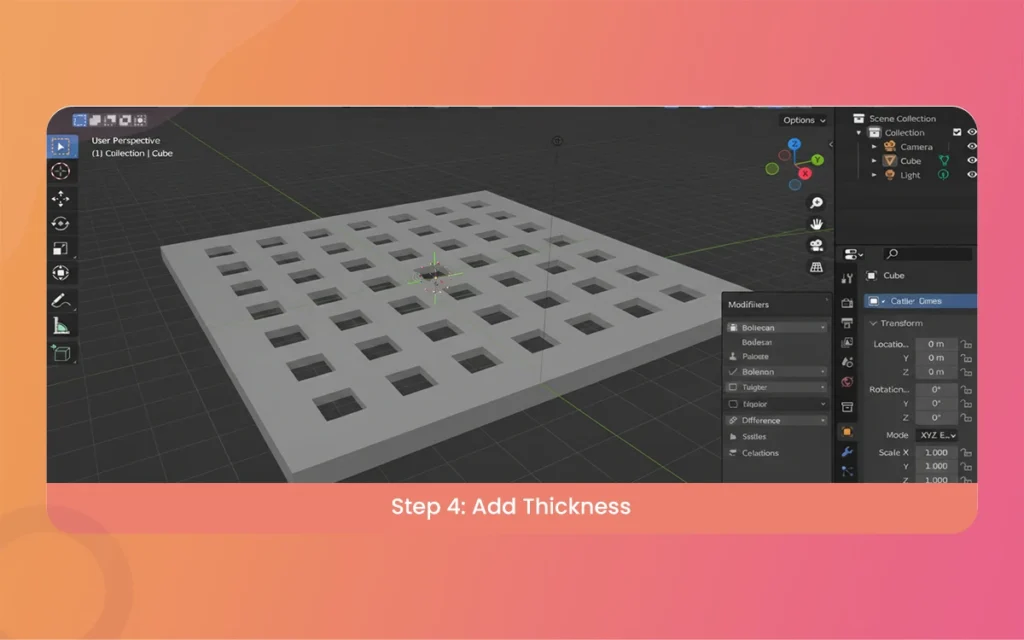
First, you need a wall. Do not just use a flat plane. Use a cube and scale it so it looks like a real wall with thickness. If your wall has no thickness, the Lubang Angin will look like a sticker rather than a hole.
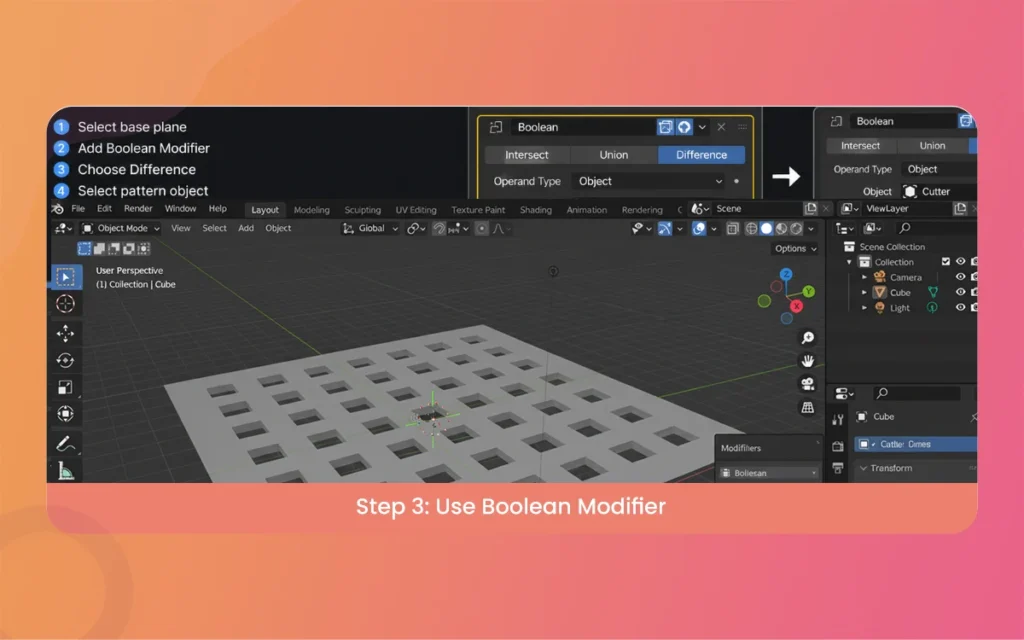
2. Using the Boolean Modifier for Lubang Angin
The Boolean modifier is still the king of making holes in 2026.
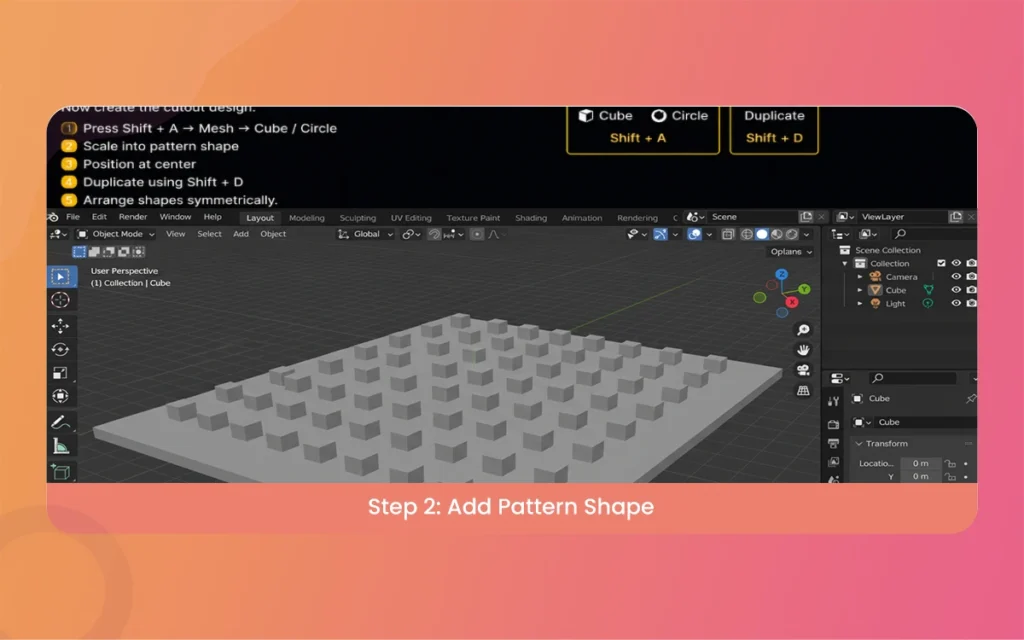
Create a second object, like a small cylinder or a cube. This will be your “cutter.”
Place the cutter where you want the ventilation hole to be.
Select your wall, go to the Modifiers tab, and add a Boolean Modifier.
Select the cutter object as the target.
Set it to “Difference.”
Now, you should see a hole in your wall. The cool thing about 2026 Blender is the “Live Boolean” performance is much faster, so you can move the cutter around and see the hole move in real-time without the computer lagging.
Lubang Angin
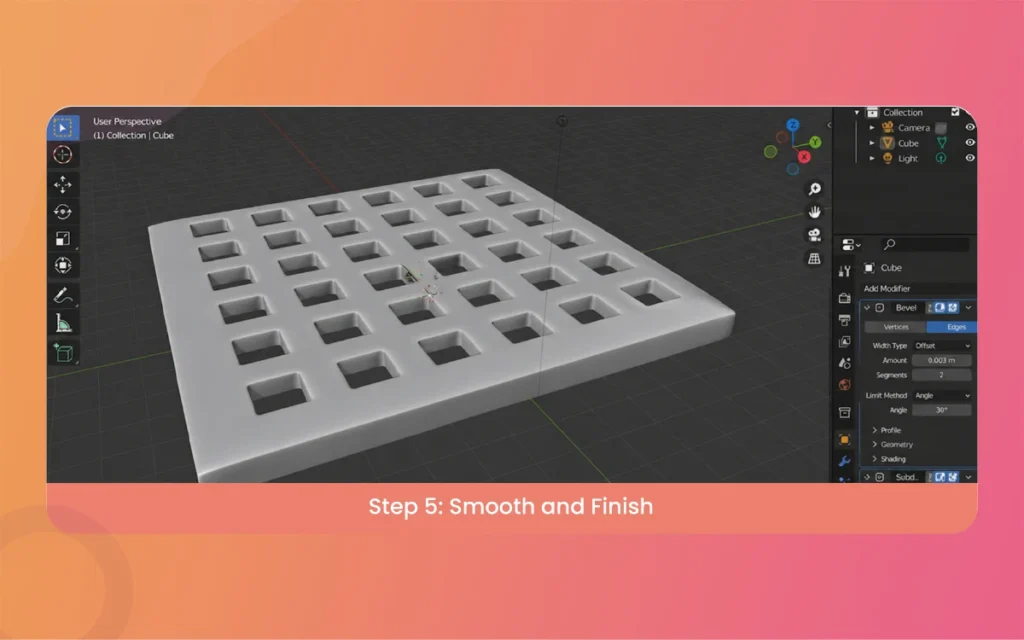
3. Creating Patterns with the Array Modifier
You don’t want just one Lubang Angin, right? You want a row of them. Use the Array Modifier on your cutter object before applying the Boolean. This allows you to create 10 or 20 holes at once. You can adjust the “Offset” to make sure the holes are spaced perfectly.
Advanced Tips for 2026 Blender Users
If you want to be a pro, you should check out the new SDF Nodes in Geometry Nodes. This is a new feature for the 2026 releases. It allows you to create holes using math instead of cutting meshes. It is much cleaner and won’t crash your computer if you have thousands of holes.
Also, think of to use the Bevel Modifier. Real walls are never perfectly sharp. Adding a tiny bevel to the edges of your Lubang Angin will catch the light and make it look like it was actually built by a mason.
Detailed Breakdown of Lubang Angin Workflow
Instead of a table, here is a detailed list of what you need to keep in mind while working on your 3D ventilation systems:
Software Version: Use Blender 5.1 or higher for the best stability and new modifier features.
Mesh Type: Always use Quads. Avoid Ngons around your holes because they make the shadows look weird during rendering.
Material Choice: For a Lubang Angin, use a slightly rough material like concrete or matte paint. This helps the shadows look more natural.
Lighting Tip: Place a light source (like an Area light) behind the wall. This will push light through the Lubang Angin and create beautiful “god rays” in your interior render.
Performance: If your scene gets heavy, use the “Decimate” modifier on your cutter objects to keep the polygon count low.
Lubang Angin
Common Mistakes to Avoid
A common mistake is making the holes too small. In real life, if a Lubang Angin is too tiny, it won’t actually let enough air through. Look at real-world references from Indonesian architecture. Usually, these holes are about 15cm to 20cm wide.
Another mistake is forgetting the “Inside” of the hole. When you cut a hole in a wall, you can see the inside surface. Make sure your wall material is applied correctly to the inside of the hole, or it will just look like a black void.
Lubang Angin
Finally
Creating a Lubang Angin in Blender is an excellent exercise for architectural modeling. Try both the classic Boolean and new Geometry Nodes methods to make your 3D houses stand out.
Embrace your mistakes—they are a part of your unique creative journey. Sometimes, those “human errors” in spacing or shape can bring authentic, heartfelt personality to your 3D models, making them look more like real, hand-built homes. Keep blending, and let your designs breathe with plenty of fresh air and imagination.
Related Article
September 1, 2026
Augmented Reality News: 7 Exclusive Breakthroughs for an Incredible Year | The Morphic Studio
Navigating the Latest Augmented Reality News Environment Welcome to another exciting deep dive into the statistical universe brought to you by The Morphic Studio. If you have been keeping up with tech headlines lately, you already know that statistical overlays and spatial computing are changing how we interact with our physical surroundings. The year 2026 […]
September 1, 2026
VR Horror Games: 13 Incredible Titles for a Brutal Scare – The Morphic Studio
Welcome to the ultimate guide for anyone looking to test their nerves inside a headset. When you strap a display to your face, flat screen rules no longer apply. VR Horror Games You are no longer watching a character run from danger on a distant monitor, because you are right there in the middle of […]
August 31, 2026
Meta Quest 4 Release Date: The Master Guide to 2026’s Most Incredible VR | The Morphic Studio
Virtual reality has traveled a long road over the last few years. We have moved from bulky, tethered headsets that needed expensive gaming computers to sleek, standalone machines that fit right inside a small travel backpack. If you follow immersive technology here at The Morphic Studio, you already know that Meta has been leading the […]