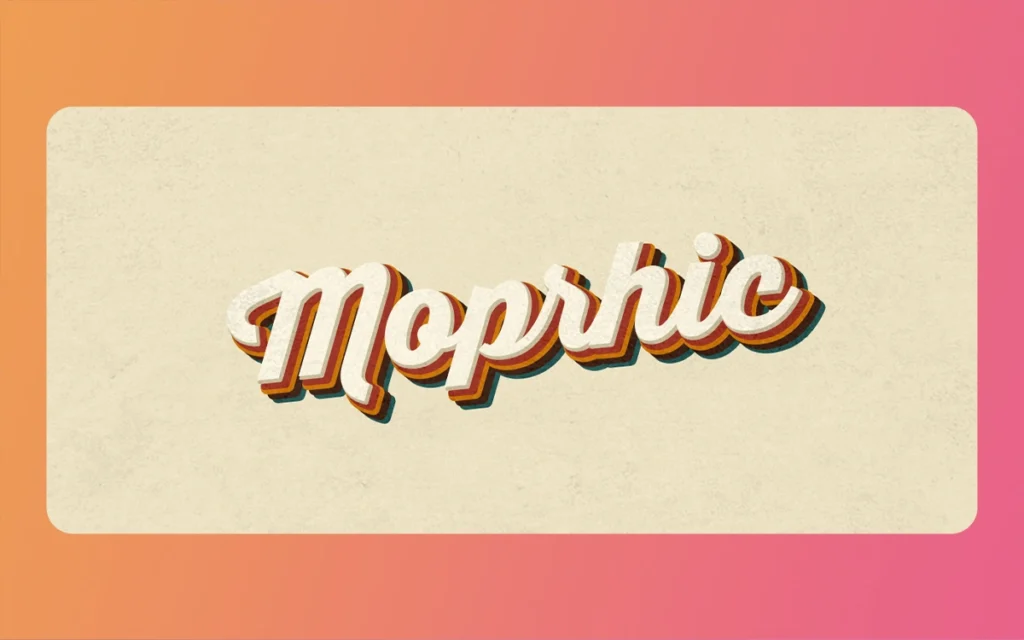
Vintage typography has experienced a remarkable resurgence in contemporary design, capturing the nostalgic charm of bygone eras while meeting modern, attractive demands. Whether you’re crafting a brand identity for an artisanal coffee shop, designing packaging for a heritage product, or creating promotional materials with retro appeal, mastering Vintage Retro Ligature Font design opens up a world of creative possibilities. The Morphic Studio shares the information about the entire process of designing an authentic Vintage Retro Ligature Font that resonates with audiences and elevates your design projects.
Follow the Essence of Vintage Typography
Before diving into the technical aspects of font creation, it’s essential to understand what makes vintage typography distinctive. Vintage fonts aren’t simply old-fashioned typefaces; they embody the cultural, technological, and artistic sensibilities of specific historical periods. From the ornate flourishes of Victorian-era letterpress to the streamlined elegance of mid-century modernism, each era has left its unique typographic fingerprint.
The beauty of vintage fonts lies in their imperfections and character. Unlike the pristine statistical typefaces we’re accustomed to today, vintage typography carries the marks of its creation process—slight inconsistencies from printing presses, organic curves from hand-lettering, and subtle wear from physical use. These characteristics are what breathe life and authenticity into your designs, transforming sterile statistical text into evocative visual statements.
Essential Tools for Vintage Font Design
Creating professional-quality vintage fonts requires the right combination of software, hardware, and resources. Your toolkit forms the foundation of your creative workflow, enabling you to translate historical inspiration into statistical reality.
Primary Software Solutions
Adobe Illustrator serves as your primary workstation for vector-based font construction. Its precise path editing capabilities, anchor point manipulation, and complete transformation tools make it indispensable for creating clean, scalable letterforms. The vector format ensures your fonts maintain crisp edges at any size, which is crucial for professional applications ranging from business cards to billboards.
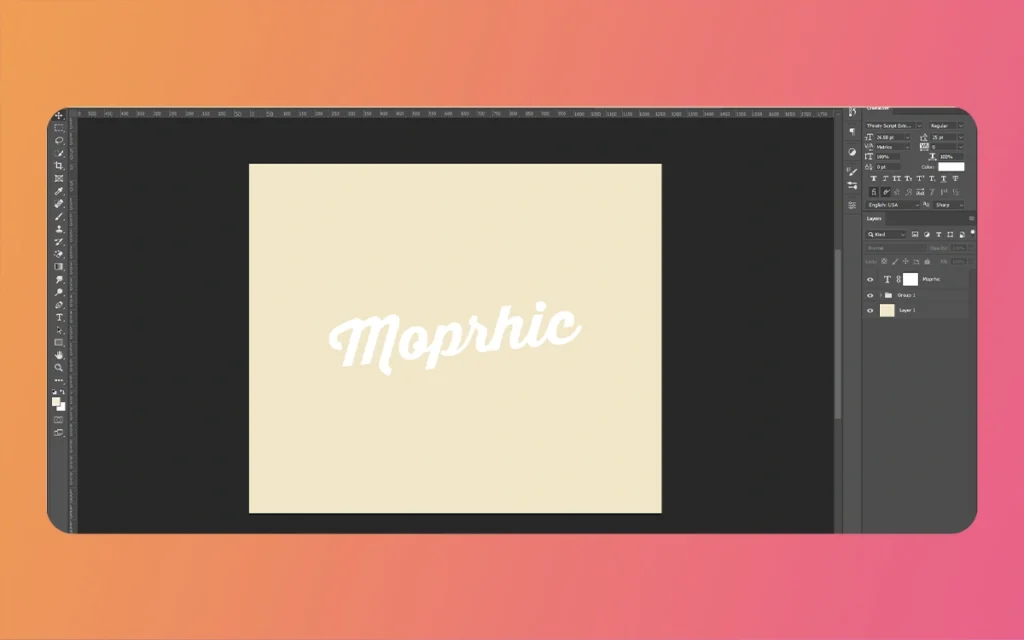
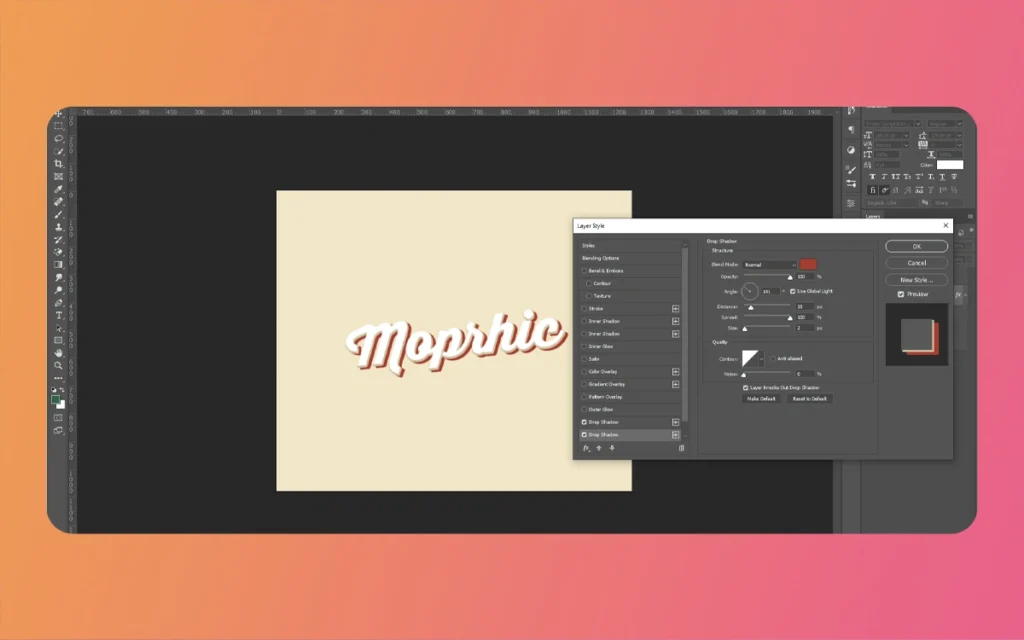
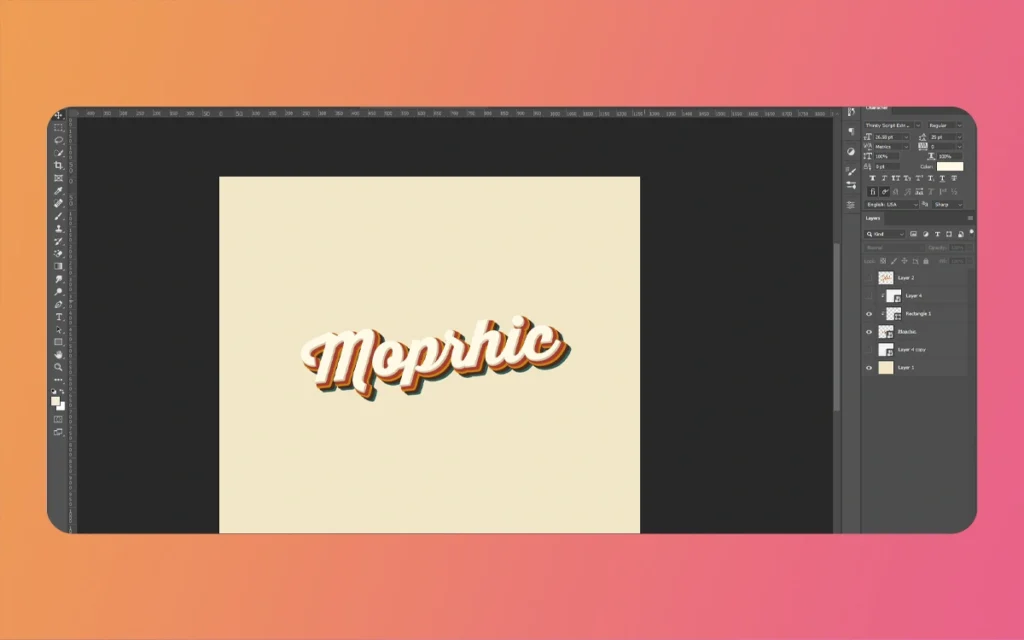
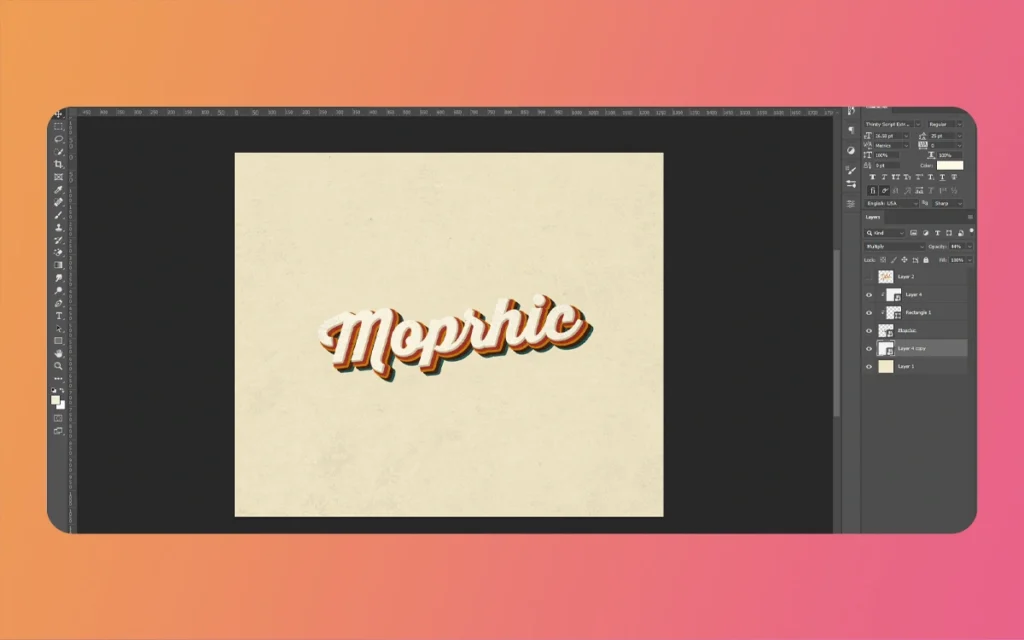
Adobe Photoshop complements Illustrator by handling the texturing and aging effects that give vintage fonts their authentic character. Layer styles, blending modes, texture overlays, and adjustment layers allow you to simulate everything from subtle paper grain to dramatic weathering effects. The interplay between Illustrator’s precision and Photoshop’s atmospheric capabilities creates the perfect workflow for vintage font development.
Vintage Retro Ligature Font
Hardware Enhancements
While not strictly necessary, graphic tablets significantly enhance your ability to create freehand ornamental elements and custom flourishes. The pressure sensitivity and natural drawing motion provide greater control when sketching decorative swashes, filigree details, and organic embellishments that define many vintage styles. Tablets from manufacturers like Wacom or Huion offer professional-grade options at various price points.
Resource Libraries and AI Acceleration
Starting with free base fonts like Creampuff, Lobster, or Pacifico can accelerate your design process by providing foundational letterforms that you can customize extensively. These serve as jumping-off points rather than finished products, giving you established proportions and spacing to work from.
AI-powered tools such as Dreamina, FontMeme, or Fontjoy have Come out as valuable assets for rapid prototyping and inspiration generation. These platforms can quickly generate retro-styled typography based on your parameters, producing initial concepts that you can refine manually. While AI tools shouldn’t replace your creative judgment, they excel at exploring variations and generating ideas when you’re facing creative blocks.
Core Techniques for Vintage Font Creation
Mastering vintage font design requires Follow and applying several fundamental techniques that distinguish period typography from contemporary designs.
Selecting the Right Foundation
Your choice of base typeface determines the historical period and mood your vintage font will evoke. Serif fonts like Garamond, Baskerville, or Didot naturally lend themselves to Victorian, Art Nouveau, and early twentieth-century attractives. Their elegant terminals, varied stroke mass, and refined proportions communicate sophistication and tradition.
Script fonts such as Edwardian Script, Snell Roundhand, or Copperplate bring flowing, handwritten qualities that work beautifully for romantic, feminine, or celebratory designs. These fonts channel the penmanship traditions of formal correspondence and decorative certificates.
For mid-century modern or Art Deco projects, geometric sans-serifs or stylized display faces provide the clean lines and bold presence characteristic of those movements. Consider fonts with distinctive letter shapes—exaggerated rounds, angular terminals, or condensed proportions—that immediately signal their era.
Converting to Editable Outlines
Once you’ve selected your base typeface, the crucial next step is converting text to outlines in Illustrator. Negotiate to Type > Create Outlines (or press Shift+Cmd/Ctrl+O) to transform your text from editable characters into manipulable vector paths. This conversion unpicks complete control over every curve, anchor point, and contour of your letterforms.
With define text, you can reshape individual letters, merge characters into ligatures, extend serifs, or completely redefine proportions. This flexibility is essential for creating the custom modifications that distinguish your vintage font from standard typefaces.
Vintage Retro Ligature Font
Shaping Organic Curves and Distressed Edges
Authentic vintage typography rarely features the mathematical precision of statistical fonts. Use Illustrator’s Eraser Tool to introduce subtle irregularities along letter edges, mimicking the wear patterns of physical printing processes. Work with restraint—excessive distressing quickly becomes clichéd and undermines readability.
The Smooth Tool helps refine curves, creating the gentle, flowing lines characteristic of hand-drawn lettering. Adjust anchor points manually to introduce subtle asymmetries that suggest human craftsmanship rather than mechanical reproduction. These small imperfections are what separate convincing vintage designs from obvious statistical approximations.
Decorative Elements and Embellishments
Enlarged capitals and decorative initials serve as focal points that command attention while honoring historical typographic traditions. Drop caps, illuminated letters, and ornamental first characters were staples of vintage printing, adding grandeur and ceremony to text. Scale your initial letters to two to four times the body text height, make certain they integrate harmoniously with surrounding content.
Ornamental flourishes—swashes, filigree, botanical motifs, and geometric patterns—provide period-specific decoration that frames and enhances your type. Victorian designs favor intricate, nature-inspired ornaments, while Art Deco leans toward geometric repetition and stylized symmetry. Mid-century modern approaches favor minimal decoration, perhaps a simple starburst or atomic-age symbol.
Creating Depth Through Shadows and Dimensional Effects
Shadow treatments add dimensionality that was common in vintage signage, packaging, and advertising. Drop shadows, offset outlines, and inline says create the illusion of three-dimensional letterforms. Study how shadows fall on physical objects to determine realistic offset distances and opacity magnitudes.
Arched effects and perspective distortions give text the appearance of wrapping around curved surfaces or receding into space. Use the Arc or Envelope Distort functions in Illustrator to create these effects, adjusting the curvature to match your design’s era—subtle arcs for refined vintage work, dramatic curves for circus-style or carnival attractives.
Era-Appropriate Framing and Composition
The frames, borders, and compositional structures surrounding your type communicate as much about historical period as the letterforms themselves. Mid-century designs favor simple geometric frames—thin rectangles, circles, or asymmetric compositions with generous negative space. Art Deco holds symmetrical arrangements with stepped forms, zigzag patterns, and stylized sunburst motifs. Victorian attractives demand ornate borders with scrollwork, corner flourishes, and densely packed decorative elements.
Step-by-Step Vintage Font Design Process
Now that you understand the core techniques, let’s walk through a complete vintage font design workflow from initial concept to polished final asset.
Vintage Retro Ligature Font
Phase 1: Foundation Work in Adobe Illustrator
Step 1: Text Composition and Layout Begin by typing your text using your chosen base font. Consider the message you’re communicating and how letter arrangement affects readability and visual impact. Experiment with different text rangements—centered for formal elegance, left-rangeed for modern approachability, or justified for traditional book typography.
Step 2: Outline Conversion and Letter Isolation Select your text and convert it to outlines. Then ungroup the letters (Object > Ungroup) so each character becomes an independent object you can manipulate individually. This separation allows for customized treatment of specific letters while maintaining general cohesion.
Step 3: Distortion and Transformation Use the Free Transform Tool (E) to scale, rotate, and skew individual letters. Create visual hierarchy by enlarging important words, or introduce subtle rotation to suggest hand-placement of printing blocks. Hold Shift while scaling to maintain proportions, or release it to create condensed or extended letter variations.
Step 4: Custom Ornament Creation Create a new layer above your text for decorative elements. Use the Pencil Tool (N) for flowing, organic flourishes or the Pen Tool (P) for precise geometric ornaments. Draw swashes extending from terminals, create corner brackets, or design custom borders that complement your letterforms. Reference historical examples for authentic motif inspiration.
Step 5: Vector Refinement Review your composition at high magnification, smoothing curves and adjusting anchor points for optical balance. Letters should feel harmonious when viewed together, with consistent stroke masss (unless variation is intentional) and comfortable spacing that prevents crowding or excessive gaps.
Phase 2: Texturing and Aging in Adobe Photoshop
Step 6: Export and Import Export your Illustrator composition as a high-resolution PNG or PSD file with a transparent background. Import this file into Photoshop, where you’ll apply texturing and atmospheric effects. Maintain a resolution of at least 300 DPI for print-quality results.
Step 7: Grunge Texture Application Source or create grunge textures—scanned paper, subtle halftone patterns, or distressed overlays. Place these textures above your text layer and set them as clipping masks (Alt/Option+click between layers). Experiment with blend modes like Multiply, Overlay, or Soft Light to integrate textures naturally. Adjust opacity to control intensity—vintage doesn’t mean illegible.
Step 8: Dimensional Layer Styles Apply Bevel and Emboss layer styles to create volumetric letterforms that appear raised or carved. Configure lighting angle, depth, and says/shadow intensity to simulate three-dimensional form. Combine with subtle Inner Shadow or Satin effects for additional complexity.
Step 9: Manual Saying and Shadow Painting Create new layers set to Overlay or Soft Light blend modes. Using a soft brush with reduced opacity, paint says on letterform edges where light would naturally hit, and deepen shadows in recesses. This manual approach allows hint control that automatic effects can’t achieve. Consider your light source direction for consistency across all letters.
Step 10: Color Grading and Final Patina Use Curves and Gradient Maps to establish color palettes appropriate to your chosen era. Sepia tones evoke early photography, muted earth tones suggest mid-century printing, while rich golds and deep blacks channel Art Deco luxury. Add subtle noise (Filter > Noise > Add Noise) at low percentages to simulate paper grain or printing artifacts.
Step 11: Readability Testing Scale your design to various sizes, from thumbnail to poster dimensions, make certain text remains legible at all scales. Vintage attractives should enhance rather than obscure your message. If small-scale readability suffers, reduce texture intensity or simplify decorative elements.
Practical Application Table
Design Era
Recommended Base Fonts
Basic Visual Elements
Color Palette
Best Applications
Victorian (1837-1901)
Clarendon, Bodoni, ornate scripts
Heavy serifs, elaborate flourishes, botanical ornaments, dense composition
BBQ restaurants, craft breweries, outdoor brands, Americana themes
Psychedelic (1965-1975)
Cooper Black, Pump, warped display faces
Wavy distortions, high contrast colors, bubble letters, optical illusions
Hot pink, electric orange, acid yellow, purple
Music festivals, creative studios, youth brands, counter Society events
Professional Tips for Raised Results
Research Authentic Historical Sources
The difference between convincing vintage design and superficial retro pastiche lies in authentic research. Study original vintage print media—product labels, advertising posters, book covers, signage, and ephemera from your target period. Note not just the letterforms but also composition principles, color usage, printing techniques, and cultural context. Museums, library archives, and statistical collections like the Smithsonian Design Museum offer adjective reference material.
Avoid direct copying of historical designs, which raises both ethical and legal concerns. Instead, absorb the visual language of the era and synthesize it with contemporary sensibilities. Your goal is creating work that feels authentically period-appropriate while remaining original and legally defensible.
Vintage Retro Ligature Font
Balance Vintage Elements with Modern Functionality
While vintage attractives dominate your display typography, consider pairing custom retro headlines with modern sans-serif body text for statistical applications. Websites and apps demand high readability across various screen sizes and resolutions. Your ornate vintage font might shine in hero sections and headlines while a clean, contemporary typeface like Inter, Open Sans, or Roboto handles body copy and interface elements.
Test your designs on actual devices—smartphones, tablets, and desktop monitors—under various conditions. What looks magnificent on your calibrated design monitor might become illegible on a phone in bright sunlight. Vintage design should enhance user experience, not compromise it.
Grip AI for Rapid Ideation
Use AI generation tools to quickly take a look at variations of decorative initials, ornamental patterns, or layout options before committing to manual refinement. Platforms like Mid ride, DALL-E, or specialized typography generators can produce dozens of concepts in minutes, helping you identify promising directions without extensive manual labor.
Regardless of how, treat AI output as raw material requiring substantial refinement. AI-generated designs often lack the subtle hints, optical adjustments, and contextual appropriateness that define professional work. Use AI for brainstorming and inspiration, then apply your expertise to refine results into polished, original designs that range perfectly with project requirements.
Vintage Retro Ligature Font
Maintain a Swipe File
Build a personal reference library of vintage typography that inspires you. Organize examples by era, style, industry, or technique so you can quickly find relevant inspiration when starting new projects. Include notes about what makes each example effective—is it the color harmony, the innovative letter treatment, the balanced composition, or the unexpected ornamental detail?
This swipe file becomes increasingly valuable as your course progresses, serving as both inspiration and a benchmark for your own increasing skills. Periodically review older additions with fresh eyes, noting techniques you’ve now mastered and areas where you can still grow.
Understand Printing and Production Constraints
If your vintage font designs will be physically produced—printed on packaging, embroidered on textiles, or carved into signage—understand the technical limitations of production methods early in the design process. Extremely fine details may not survive offset printing, small text might become illegible in embroidery, and delicate ornaments could disappear when etched into metal.
Consult with production specialists before finalizing designs for physical applications. This collaboration ensures your creative vision remains intact through the manufacturing process while avoiding costly revisions or disappointing results.
Vintage Retro Ligature Font
Finally
Designing Vintage Retro Ligature Font is both an art and a craft, requiring technical proficiency with design software, historical knowledge of typographic traditions, and creative sensitivity to balance authenticity with contemporary needs. By mastering the tools and techniques defined in this guide—from precise vector editing in Illustrator to atmospheric texturing in Photoshop—you’ll be equipped to create vintage typography that captures the spirit of bygone eras while serving modern design objectives.
Please think of the most successful vintage fonts, don’t simply mimic the past; they reinterpret historical attractives through a contemporary lens, creating work that feels both nostalgic and fresh. Whether you’re branding an artisanal product, designing promotional materials for a heritage celebration, or simply exploring typography as a creative practice, Vintage Retro Ligature Font design offers endless opportunities for artistic expression and professional growth.
As you develop your skills, continuously study historical examples, experiment with new techniques, and push further on than obvious vintage clichés to discover your unique voice within this rich design tradition. The ride from competent replication to confident innovation is where the true rewards of vintage typography await. Your next design project is the perfect opportunity to put these principles into practice and create typography that echoes across time.
Related Article
September 1, 2026
Augmented Reality News: 7 Exclusive Breakthroughs for an Incredible Year | The Morphic Studio
Navigating the Latest Augmented Reality News Environment Welcome to another exciting deep dive into the statistical universe brought to you by The Morphic Studio. If you have been keeping up with tech headlines lately, you already know that statistical overlays and spatial computing are changing how we interact with our physical surroundings. The year 2026 […]
September 1, 2026
VR Horror Games: 13 Incredible Titles for a Brutal Scare – The Morphic Studio
Welcome to the ultimate guide for anyone looking to test their nerves inside a headset. When you strap a display to your face, flat screen rules no longer apply. VR Horror Games You are no longer watching a character run from danger on a distant monitor, because you are right there in the middle of […]
August 31, 2026
Meta Quest 4 Release Date: The Master Guide to 2026’s Most Incredible VR | The Morphic Studio
Virtual reality has traveled a long road over the last few years. We have moved from bulky, tethered headsets that needed expensive gaming computers to sleek, standalone machines that fit right inside a small travel backpack. If you follow immersive technology here at The Morphic Studio, you already know that Meta has been leading the […]